How to change the font in MIUI and thus further customize your Xiaomi: so you can change the type, color and size of the letters of MIUI
Among the multiple options that MIUI offers us we find the possibility of changing the source of our Xiaomi . This option will not only allow us to change the font , but also change the font color and size .
For this it is necessary to make use of some Asian region, be it India, Hong Kong or any other. In addition, it should be noted that this adjustment that allows us to change the source is only available for MIUI 9 , MIUI 10 and MIUI 11 , so if we have a Xiaomi Mi A2 or Xiaomi Mi A3 we will not be able to do it.
How to change the font in MIUI
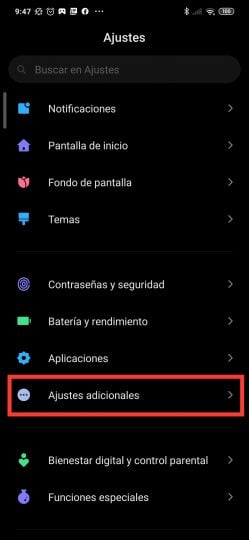


To change the font in MIUI we must perform the following steps:
- Go to Settings> Additional settings> Region
- Next we select India or Hong Kong as a region.
- Go to the Themes application, download the font that we like the most from the new lower option that will appear with hundreds of fonts and then apply it.
After applying it, it will be necessary to restart our Xiaomi mobile. Once done , we will have installed the new font in the entire MIUI interface . If we want to return to the default font, we will only perform the following steps:
- Go to Settings> Display> System font
- Once you see inside, the Themes application will open where we will go to «My Fonts» and then we will choose the default MIUI font , in this case «Roboto».
How to change font color in MIUI


If what we want is to change the font color in MIUI we will have to carry out the following steps once we have a new type of font installed:
- Go to Settings> Display> Color scheme
- Once inside we will choose the temperature and color of our favorite color in order to change the font color of our Xiaomi with MIUI.
How to change the font size in MIUI


If what we want is to change the font size of MIUI we will have to carry out the following steps:
- Go to Settings> Display> Text size
- Scroll the bottom bar until you get the desired font size in MIUI.
Do not forget that these font type change settings are only present in the various versions of MIUI, be it MIUI 11, MIUI 10 or MIUI 9, so we can use it in terminals such as Redmi Note 8 , Redmi Note 7 or Xiaomi Redmi Note 5 Plus .
The entry How to change the font in MIUI and thus further customize your Xiaomi: so you can change the type, color and size of the letters of MIUI was published first in xiaomi: Xiaomi news and news website in general, we are Xiaomi .


How can I change font color black for my redmi pro 9
ReplyDeleteDoes this keep the same font when you change the region back to the original region you are in or like the realme 6 pro does it reset back to default font, I used to be able to keep the same font upon restart with the redmi note 8 pro but I couldn't with the realme 6 pro it reverted to default once I changed the region back. Weird how chinese phones restrict functionality whats the point selling a global phone with limited options, that's like selling a wellington boot with a hole in it, pointless. Why not just not sell in other regions. Something isn't right there in my opinion that's why I don't buy chinese phones any more you just can't change anything. Same with this new widevine con, l1 is the ONLY option for new phones, l3 and you can't play netflix in anything other than 540p
ReplyDeleteSo yeah, don't is keeping after changing the region back. I think it is as it is because of laws of autor's rights in other countries. Chinese developers just disabled this function to avoid problems.
DeleteThanks for this tip. I was able to change the font on my Poco F2 Pro running MIUI 12, and the change persists across reboots.
ReplyDeleteHow do you turn font back to default instead of using downloaded fonts?
ReplyDeleteI want to know it too
DeleteJust follow the same step and choose default font.
DeleteCan redmi note 10 pro be change the font ?
ReplyDeleteHow about redmi note 10 5g? How to change the system font style of my phone. Not only on the themes? Please answer.
ReplyDeleteHi, I am Saqib a redmi note 9s user I changed my font sometime but now i am unable to get the default font back. And there no option of system font in settings of my redminote9s there is inly font size options.
ReplyDeleteH
DeleteSame ��
DeleteSame
DeleteWell whenever I change my font it remains same in google contacts and messages these 2 apps doesn't support those fonts
ReplyDeleteHelp me out plz😐
Same condition u had changed or not
DeleteSame problem, did you ever figure it out
DeleteHmm, Nobody hv the solution, Irritating Issue.
Deleteplease I really need a fix to make the fonts applicable to Contacts, message and Twitter apps
DeleteThis article provided me with a wealth of information. The article is both educational and helpful. Thank you for providing this information. Keep up the good work. font changer
ReplyDeletehow to install outside font
ReplyDeleteYou're amazing since the article you've written is both engaging and informative. Thank you for sharing that. Keep up the good work. International Phone System For Business
ReplyDeleteI am heartily thankful to you that you have shared this best information with us. I got some different kind of knowledge from your web page, and it is really helpful for everyone. Thanks once again for share it. Kubota Tractor Price
ReplyDeleteI don't see those sittings in my poco f3 miui 13.0.2
ReplyDeleteI changed my region to India but the font style still didn't appear. Any alternatives?
ReplyDeletemine too,,, i chaned my region to india but font option still didnt appear
DeleteThis is really helpful post, very informative there is no doubt about it. I found this one pretty fascinating. 경마사이트
ReplyDeleteThese type of articles keeps the users interest in the website. I found this one pretty fascinating and it should go into my collection. I am Impressed. Please keep going to write more content… 카지노사이트
ReplyDeleteBefore Commenting, I wanna say thank you for providing this great information. I feel too good to read it this awesome blog. Keep sharing this type of content. 메이저사이트
ReplyDeleteYou made my day by sharing an amazing article. I would like to be here again. Thank you! 토토사이트
ReplyDeleteThanks for the information your article brings. I see the novelty of your writing, I will share it for everyone to read together. 카지노사이트
ReplyDeleteI look forward to reading many articles from you. It's really great and informative. 토토
ReplyDeleteIt seems trick with changing region to India or H.Kong doesn't work anymore. Few days ago I got MIUI update (12.5.7) and now I can't get Fonts in Themes, even if I search for well known font type in Search in Themes. Bad move, Xiaomi..
ReplyDeleteI don't have the font option in my Themes app
ReplyDeleteThank you for the efforts you put in writing this blog. Great.
ReplyDelete바카라사이트
카지노사이트
온라인카지노
바카라사이트닷컴
Woah! It’s simple article, yet effective. Thanks for this
ReplyDelete온라인카지노
바카라사이트
카지노사이트
온라인카지노
Fonts option appeared in Themes few days ago! Bravo Xiaomi 😁
ReplyDeleteAn eSIM card is a digital SIM card that allows you to activate a cellular plan from your carrier without having to use a physical SIM card. Global eSIM Card
ReplyDelete
ReplyDeleteNice post. I learn something totally new and challenging on blogs I stumbleupon everyday. It’s always useful to read through content from other authors and use something from other sites. Feel free to visit my website;
카지노사이트
바카라사이트
온라인카지노
호텔카지노
Hi there, You have done an excellent job. I will certainly digg it and personally suggest to my friends. 카지노사이트원
ReplyDelete카지노사이트
바카라사이트
온라인카지노
I am confident they will be benefited from this web site. Feel free to visit my website;
ReplyDelete카지노사이트777
카지노사이트
바카라사이트
온라인카지노
I love your blog.. very nice colors & theme. Did you create this website yourself or did you hire someone to do it for you? Plz reply as I'm looking to create my own blog and would like to find out where u got this from. 카지노사이트존
ReplyDelete카지노사이트
바카라사이트
온라인카지노
i am grateful that i read your blog and i hope to read more from you i want to have more from you thank you for this also visit my website thank you 스포츠토토
ReplyDeleteAn APN may be a portal between the portable organization and another virtual world. Our claim APN, Olivia, for case, interfaces the versatile arrange to the web. The APN handles and interfaces the conventions of both virtual universes. An APN issues an IP address for the SIM Card.
ReplyDelete
ReplyDeleteThanks for shared this content of us this post provides helpful information for viewers.
Tata Prima 2830.K