The mijia desktop air purifier was launched under the Xiaomi financing platform
Xiaomi has launched the Mejia Desktop Air Purifier under its financing platform in the Xiaomi Store app. The device is offered at a financing price of 349 yuan ($ 52) but then sells for 399 yuan ($ 59).
Unlike previous large air purifiers that purified the entire home, the Mejia desktop air purifier was launched this time with the goal of purifying private and limited space in an open office space. This device uses an air outlet with a wide front angle to cover the respiratory area of the face. It also supports up and down rotation to adjust the angle to the user's sitting height to ensure that fresh air can be sent directly to the front and carefully clean the personal breathing space.
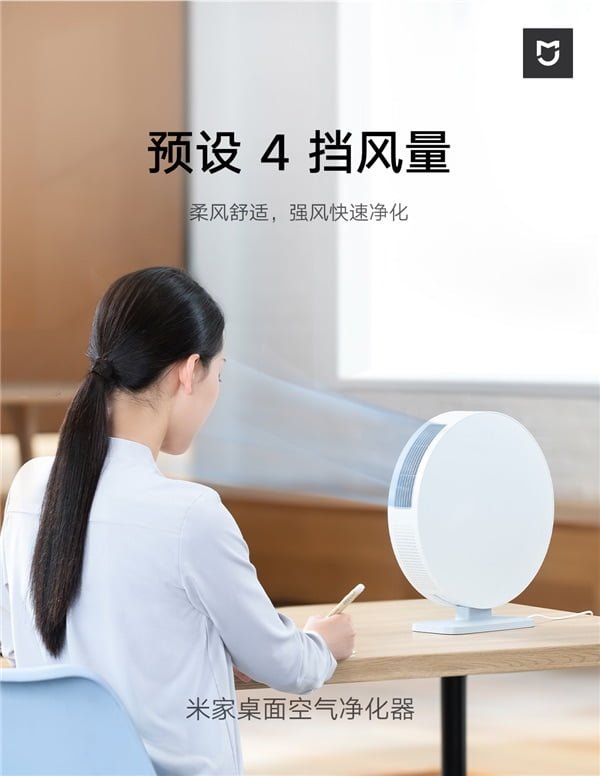
Mejia desktop air purifier can supply purified air at 4 degrees. The gentle wind produced when blowing directly into the nose and mouth does not cause any discomfort. The air duct is also optimized to reduce wind noise during use so that it can be used on the table without disturbing.
This portable air purifier uses a magnetic induction coating that is suitable for removing and replacing the filter element. This device stops automatically when it senses that the cap has been removed.
Mejia desktop air purifier has the ability to clean well against common contaminants in the office. Its treatment system uses a high-precision filter that can filter 99.6% of particles with a size of 0.3μm or more and deal with PM2.5, allergen pollen, dust, smoke and other pollutants in the air.
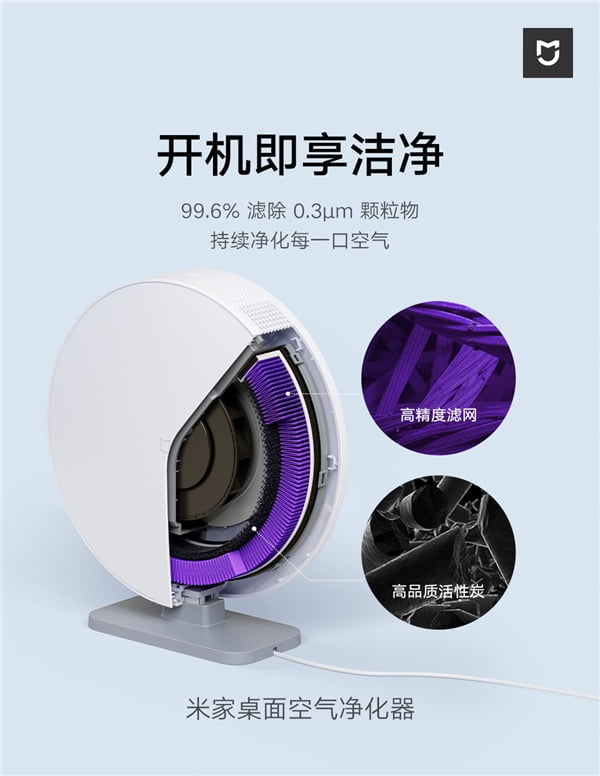
In addition, the device uses antibacterial and antiviral coatings to inactivate some common bacteria and viruses. Inactivation of bacteria and viruses can reach 99.99% and prevent secondary air pollution by filtered viruses and bacteria to reduce the risk of infection for office workers during the flu season. It also absorbs formaldehyde molecules through high quality activated carbon, purifies some odors and purifies the air.
This desktop air purifier supports Wi-Fi to connect to the Mejia app. With the phone app, you can check the life of the filter at any time, and you can also remotely control and turn on / off the purifier. If you forget to turn off the air purifier after work, you can turn it off on your phone. It also supports communication with other mijia smart devices as well as voice control via XiaoAI-enabled devices.
Posted by mijia Desktop Air Purifier was released under the Xiaomi Financing Platform for the first time at the Xiaomist.Com . appeared.


Extremely useful information which you have shared here. This is a great way to enhance knowledge for us, and also helpful for us. Thankful to you for sharing an article like germicidal air purifiers.
ReplyDeleteThis comment has been removed by the author.
ReplyDeleteYou have provided valuable data for us. It is great and informative for everyone. Keep posting always about germicidal air purifiers chicago. I am very thankful to you.
ReplyDeleteA very delightful article that you have shared here. Your blog is a valuable and engaging article for us, and also I will share it with my companions who need this info, compressed dry air testing in Malaysia Thankful to you for sharing an article like this.
ReplyDeleteI generally check this kind of article and I found your article which is related to my interest. Genuinely it is good and instructive information. Thankful to you for sharing an article like this.Reliable Hot Water Services Melbourne
ReplyDelete